
Defibrillators & emergency location help
A practical page for Old Weston villagers and visitors: where to find nearby public defibrillators, how to share an exact location, and what to have ready before an emergency happens.
In a life-threatening emergency
Call 999 immediately. Put your phone on speaker so you can keep both hands free and follow the call handler’s instructions.
- 1 Check for danger and response. Shout for help and check whether the person is breathing normally.
- 2 Call 999 and start CPR if the person is unresponsive and not breathing normally.
- 3 Send someone else for a defib if one is nearby. If you are alone, do not leave the person to search for one.
- 4 Switch on the defib and follow the voice prompts. The machine will tell you exactly what to do.
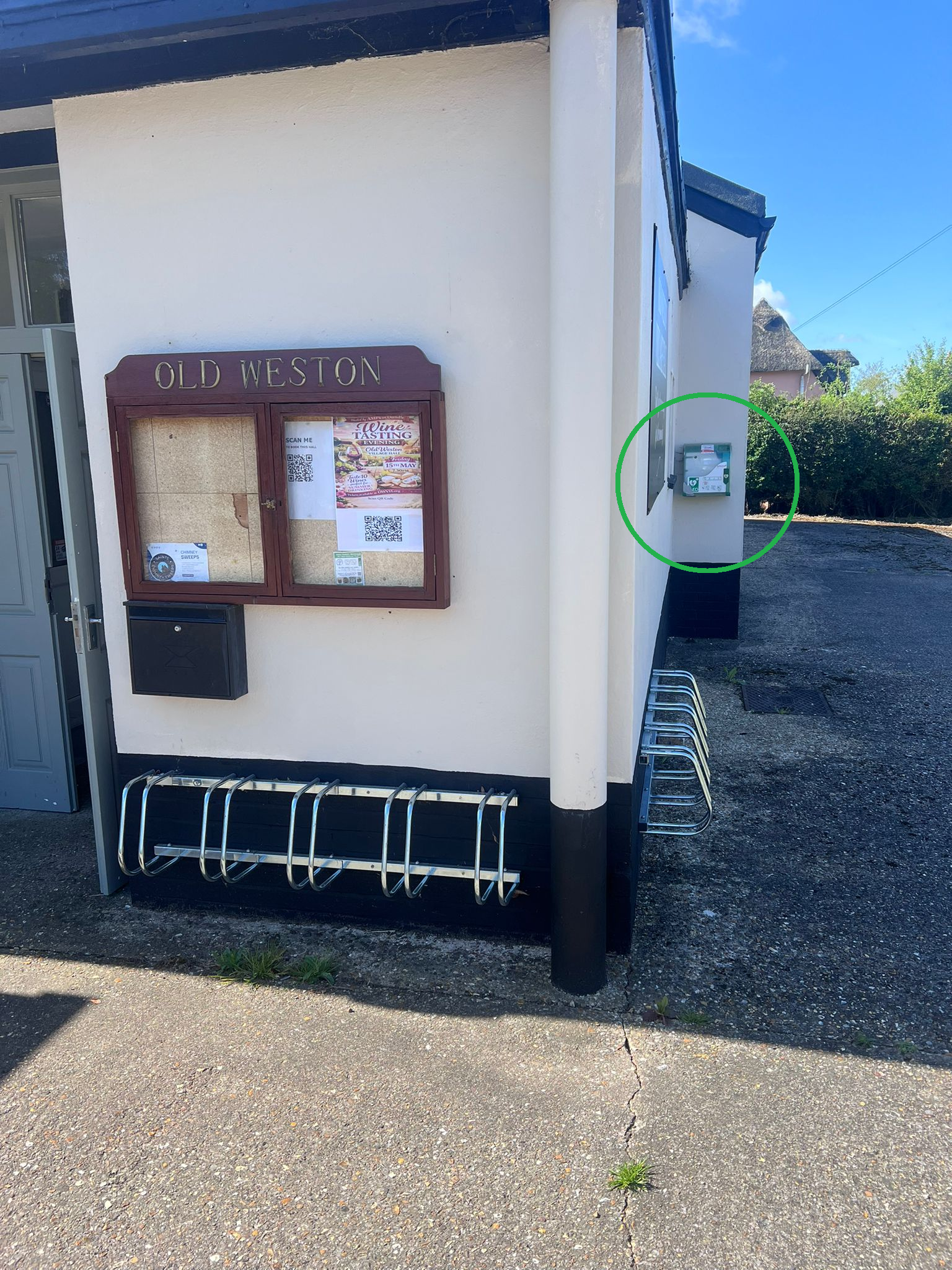
Local defibs if you’re out and about
These are nearby public access defibrillators around Old Weston and neighbouring villages. Distances are approximate. In an emergency, call 999 first; the call handler can direct you to the most suitable available defib.
| Approx. distance | Location | Address / area | Access shown |
|---|---|---|---|
| 0.1 mi | Old Weston Village Hall | Village Hall, Main Street, Old Weston, PE28 5LL | Public, 24/7 |
| 1.6 mi | Brington C of E Primary School | Church Lane, Brington, PE28 5AE | Public, 24/7 |
| 2.0 mi | Molesworth Telephone Box | High Street, Molesworth, PE28 0QF | Public, 24/7 |
| 2.0 mi | Winwick Village Hall | Main Street, Winwick, PE28 5PN | Public, 24/7 |
| 2.6 mi | Cross All Saints Church / Hamerton | Sawpit Lane, Hamerton, PE28 5QS | Public, 24/7 |
| 2.6 mi | Barham telephone-box area | The Village, Barham, PE28 5AB | Public, 24/7 |
| 2.7 mi | Catworth Village Hall | Church Road / 47 Church Road, Catworth, PE28 0PA | Public, 24/7 |
| 2.9 mi | Catworth Telephone Kiosk | High Street, Catworth, PE28 0PF | Public, 24/7 |
| 2.9 mi | Bythorn Village Hall | Main Street, Bythorn, PE28 0QR | Public, 24/7 |
| 3.0 mi | Buckworth Cricket Club | Church Road, Buckworth, PE28 5AL | Public, 24/7 |
For planning ahead, you can also use Defib Finder to familiarise yourself with nearby defib locations. Do not delay calling 999 in an emergency.
Plan ahead with what3words
In a stressful emergency, remembering directions can be difficult. what3words can help you describe a precise location using three words. The best time to set it up is now, before anyone needs it.
Download the app
Install what3words on your phone and encourage family members, neighbours, and regular visitors to do the same.
Save your home entrance
Stand where emergency services should arrive, such as the front door, main gate, driveway entrance, or farm track entrance. Open the app and save the three-word address.
Keep it to hand
Write your what3words address with your postcode and landmarks. Keep it near the phone, on the fridge, or with other emergency information.
Tip: use what3words alongside your normal address, postcode, nearest road, visible landmarks, and any access instructions. If you are out walking, cycling, or driving on rural lanes, the app can help you tell the 999 call handler exactly where help is needed.
Other emergency details villagers may find useful
A few minutes of preparation can make it easier for someone else to help you, especially if they are a visitor, neighbour, delivery driver, or passer-by.
At home
- Keep your full address, postcode, and what3words address visible near the phone.
- Note the best access point, gate code, key safe instructions, or difficult driveway details.
- Keep a list of emergency contacts and important medical information where it can be found quickly.
Out and about
- Carry a charged mobile phone when walking, cycling, riding, or driving locally.
- Familiarise yourself with local defib locations before you need them.
- Tell someone your route if you are heading out alone, especially in fields, lanes, or less obvious locations.
At events
- Make sure organisers know where the nearest defib and first aid kit are located.
- Agree who would meet the ambulance and guide responders to the casualty.
- Keep access routes clear for emergency vehicles wherever possible.
Print and complete: home emergency location note
Complete this and keep it somewhere easy to find. It is especially helpful for visitors, neighbours, carers, children, or anyone who may need to call 999 from your home.
My emergency location details
In an emergency, call 999 first. Read these details clearly to the call handler.
- House name / number
- Street / village
- Postcode
- what3words
- ///
- Best access point
- Nearest landmark
- Gate code / key safe
- Emergency contact
- Important medical notes
Useful links
These links are for preparation, familiarisation, and further first aid guidance. In a serious or life-threatening emergency, call 999 immediately.
- Defib Finder Use this to familiarise yourself with nearby defib locations before an emergency. It is not a replacement for calling 999.
- The Circuit: national defibrillator network For defib guardians and organisations managing public access defibrillators.
- St John Ambulance: how to use a defibrillator Step-by-step public first aid guidance for using an AED.
- British Heart Foundation: understanding defibrillators Clear advice on what defibs are, when to use them, and why early CPR matters.
- NHS 111: urgent medical help that is not life-threatening Use NHS 111 for urgent medical help when it is not a life-threatening emergency.
Plan now, act quickly later
Save your home what3words address, keep this page bookmarked, and make sure people in your household know where the nearest defib is. In an emergency, call 999 first and follow the call handler’s instructions.